Based in Arlington, TX. Serving any business, anywhere.
  (901) 490-4750
  contact@uicompass.com

One colour is not a palette
Most small businesses have a brand colour. It came from a logo, and the logo was designed for a sign, a van, or a business card — surfaces where there is exactly one background and it is not going to change.
A website has many backgrounds. White cards on grey pages. Text on photographs. Buttons on tinted panels. Everything again in dark mode, on a phone, outdoors, at half brightness.
A single hex code cannot do all of that, and asking it to is what produces the two failures you see constantly: text in the brand colour that nobody over forty can read comfortably, and a dark mode where the brand colour turns into a bruise.
The fix is not to abandon the colour. It is to give it relatives.
Roles, not names
The single most useful change is to stop naming colours after what they look like and start naming them after what they do.
Not --green, --light-green, --dark-grey. Instead:
:root {
  --surface:        #ffffff;  /* page background */
  --surface-raised: #f7f4ef;  /* cards, panels */
  --text:           #1f1c19;  /* body copy */
  --text-muted:     #5c574f;  /* captions, meta */
  --border:         #e2ddd4;  /* dividers, input outlines */
  --accent:         #006940;  /* brand — fills, links */
  --accent-text:    #005533;  /* brand, dark enough for small text */
  --on-accent:      #ffffff;  /* text sitting on the accent */
}
Eight variables. Every component references the role, never the value.
The payoff arrives the moment you add a second theme. Dark mode becomes a second block that redefines the same eight names — no component CSS changes at all:
@media (prefers-color-scheme: dark) {
  :root:not([data-theme="light"]) {
    --surface:        #14120f;
    --surface-raised: #1e1b17;
    --text:           #f2ede4;
    --text-muted:     #a8a196;
    --border:         #332e28;
    --accent:         #24c07e;
    --accent-text:    #4fd79b;
    --on-accent:      #0d1a13;
  }
}
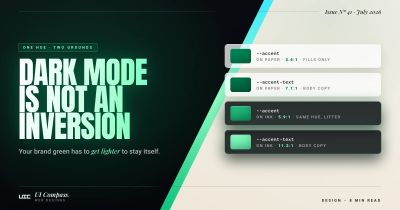
Notice what changed and what did not. The hue is the same green. The lightness moved in the opposite direction from the surface. And --on-accent flipped from white to a very dark green, because white text on a bright mint button is worse than dark text on it.
Dark mode is not an inversion
Three specific mistakes account for nearly every bad dark mode.
Pure black backgrounds. #000000 against light text produces a harsh, high-contrast edge that many people find fatiguing, and on OLED screens it can produce visible smearing as text scrolls. A very dark neutral — somewhere in the range of #12–#1a — reads as black and is easier to look at. It also gives you somewhere to go for raised surfaces.
Pure white text. Same problem from the other side. Body text at #ffffff on a near-black surface is over-contrasted. Softening to a warm off-white keeps it comfortable and still clears AA by a wide margin.
Elevation by shadow. In light mode, a card floats because it casts a shadow. In dark mode, a shadow on a dark surface is invisible. Dark interfaces convey elevation by making raised surfaces lighter than the page, which is why --surface-raised goes up in dark mode and down in light mode. If you only have one dark grey, every card will disappear into the page.
And the one that ruins logos: never implement dark mode with a CSS invert() filter. It inverts hue as well as lightness. Green becomes magenta, photographs become negatives, and your carefully chosen brand becomes a colour nobody has ever seen on your van.
Making the brand colour work at text size
Here is the situation almost every business runs into.
Your brand green is a mid-tone. Against white it lands somewhere around 3.5:1. That is fine for a large heading, fine for a button fill with white text on it, fine for an icon — and it fails the 4.5:1 minimum for normal-size text.
Three legitimate responses, in the order we try them:
1. Change the use, not the colour. Ask whether that colour needs to be text at all. Brand colours usually work best as fills, borders, and large display type. Body copy in a brand colour is rarely a design win even when it passes.
2. Add a darker sibling. Same hue, more depth, reserved for small text and links on light backgrounds. That is what --accent-text is for in the block above. Visitors read it as the same colour; a contrast checker reads it as compliant.
3. Invert the relationship. Instead of green text on white, use white text on a green block. This often clears contrast comfortably and is usually the stronger design anyway.
Test against the background you will actually use. A colour checked against #ffffff and then deployed on a #f7f4ef card has not been checked.
The set you actually need
For a small business site, this is enough:
- Two neutral scales. Four or five steps of surface (page, raised, sunken, border) and three steps of text (primary, muted, disabled). Warm or cool, but pick one — mixing a cool grey text on a warm beige surface reads as a mistake even to people who cannot name why.
- A brand hue at three or four lightness steps. One for fills, one darker for text on light, one lighter for dark mode, optionally one very light for tinted backgrounds.
- Three semantic colours. Success, warning, error. Each needs to work as text and as a background tint. Do not use your brand green as your success green if your brand green is also your button colour — visitors cannot tell "this worked" from "click here."
That is roughly fifteen values. It will build an entire website, and the constraint is a feature: restraint is what makes layouts feel considered, and a palette with fourteen accents does not produce a richer site, it produces an inconsistent one.
Never colour alone
One rule that sits underneath all of this: colour must never be the only thing carrying meaning.
Red text for an error is fine, as long as there is also an icon or the word "Error." A green tick is fine, as long as it is a tick. A required field marked only by a red asterisk that is itself a colour cue is not.
This matters for people with colour vision deficiencies, and it matters in ordinary conditions too — a phone in direct sunlight, a cheap monitor with a heavy blue cast, an ageing projector in a client meeting. Redundant cues are not an accessibility tax; they are what makes an interface survive the real world it will be used in.
Checking it
Fifteen minutes, once:
- Every text-and-background pair through a contrast checker. Body copy needs 4.5:1, large text 3:1, in both themes.
- Button borders, input outlines, focus rings, and meaningful icons need 3:1 against whatever they sit on.
- Switch your operating system to dark mode and load every page. Look for cards that vanished, logos that turned into a black rectangle, and any element that was defined only inside a media query.
- Take a phone outside on a bright day and read your own homepage. This finds things no simulator will.
Step four is the one people skip, and it is the one that catches the muted grey caption that looked elegant on a calibrated monitor in a dark office and is completely illegible on a bus.
Frequently asked questions
Does my site actually need a dark mode?
Not necessarily. A site that commits to one well-executed light theme is entirely respectable, and it is much better than a dark mode that was bolted on and is half-broken. What you should not do is ignore the question — if your CSS leaves the page background transparent or relies on the browser default, some visitors will get an unintended mix of your light text on their dark chrome. Either implement it properly or paint your backgrounds explicitly.
Can I just use a CSS filter to invert my light theme?
No. filter: invert() inverts hue as well as lightness, so your green becomes magenta, your photographs become negatives, and your logo becomes unrecognisable. It also collapses the deliberate hierarchy between your background and your surfaces. Dark mode is a second set of values for the same roles, not a transformation of the first set.
What contrast ratio do I actually need?
WCAG 2.2 at level AA requires a contrast ratio of at least 4.5:1 for normal-size text and 3:1 for large text, with large defined as 18pt, or 14pt bold, and above. A separate criterion requires 3:1 for the visual boundaries of user interface components and meaningful graphics. Those are minimums for compliance, not targets for good design — see the five-minute AA check for how to test the rest.
My brand green fails contrast on white. Do I have to change my brand?
Almost never. You have to change where you use it. A colour that fails as body text can be perfectly fine as a large heading, a button fill with white text on it, a border, or a background block. The usual fix is to add a darker sibling of the same hue for text-sized uses and keep the original for fills and large type. Your brand is still your brand; it just has a family now.
Should the brand colour change between light and dark mode?
Usually yes, and this surprises people. A mid-tone brand colour that sits comfortably on white will often be too dark and too saturated against a near-black surface — it reads as muddy and can vibrate uncomfortably. The standard move is to keep the hue and lift the lightness for dark mode, typically also dropping saturation slightly. It still reads as your colour.
How many colours should a small business palette have?
Fewer than most brand guidelines specify. Two neutral scales — one for surfaces, one for text — a brand hue at three or four lightness steps, and one semantic colour each for success, warning and error. That is enough to build an entire site. Palettes with fourteen accent colours do not produce richer designs, they produce inconsistent ones.